

Trendy Techie

Toronto-to-Halifax lifestyle blog about being a fashionable girl working and learning in the tech world.


Leave a comment

Living LUSH

DSC03672

Walking through a mall, everyone knows where that alluringly sweet scent comes from. It wafts down the halls, calling shoppers of all ages with its siren song and promises of clean, natural beauty products. Once inside LUSH, we’re trapped by the Willy Wonka’s Chocolate Factory of natural products. Don’t know what I mean? Have a look for yourself!


DSC03622 DSC03629 DSC03617 DSC03628

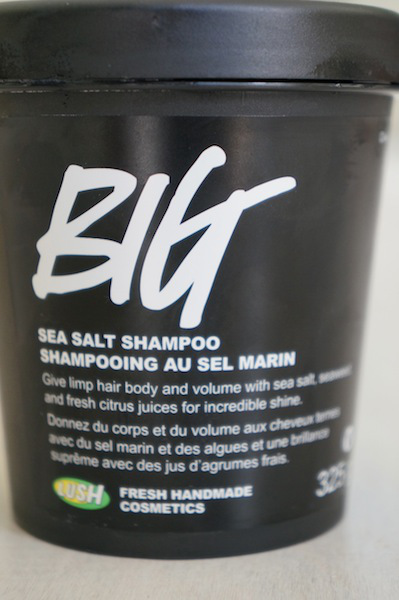
You must be thinking…surely she bought something, and this post isn’t just pictures of in-store products?! Of course I did, silly! Granted I didn’t buy nearly as many things as I wanted to, mostly because I don’t take enough baths in the summer to warrant those beautiful salts and bath bombs. Instead, I opted for the BIG shampoo and Veganese conditioner.

DSC03677

DSC03675

DSC03682
BIG is a seaweed and sea salt shampoo that exfoliates your scalp (it feels soooo good), and leaves you with shiny, soft locks. And the Veganese continues the seaweed ingredient and adds hints of citrus for shine, a lightening effect in the sun, and a wonderful clean scent that lasts until your next wash. I had never tried these products before buying them, but I really like them and would definitely buy again. They’re perfect for breezy summer days and quick, cool showers!

What’s your favourite LUSH product? Let me know in the comments! :D

~Sage


2 Comments

5 Ways to Prevent “Computer Eyes”

At work, I often find myself trying to blink away what I call “Computer Eyes”. I spend so much time on my digital devices (yes, phones, tablets and cameras count too) that I can feel it in my eyes. Programmers, bloggers, facebook and pinterest junkies alike, you know what I’m talking about. Here are 10 simple ways to keep your eyes healthy and prevent “Computer Eyes”:

1. Look away from the screen every few minutes and take a second to let your eyes focus on something else. My office has nice big windows, so I look out at the sunny rooftops in between coding sprees.

2. Adjust your seat height so your screen is just below your eye level - you never want to be looking up at a screen, because that puts even more strain on your eyes.

3. BLINK. I know, it sounds stupid, but we actually blink less when we’re looking at screens.

4. Set the brightness of your screen to adjust automatically to the surrounding light. This will make it dimmer in the dark and brighter in the light, mimicking how your eyes react to light by changing the pupil size.

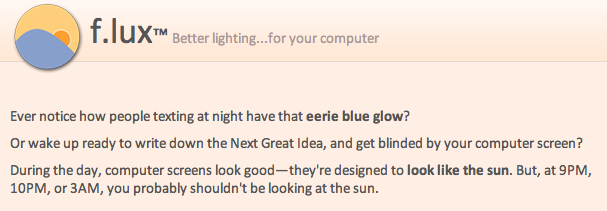
5. Download f.lux, a simple software that adjusts the tones of your computer screen at sunset. The first time I tried it I let out a huge sigh of relief, it was like a commercial. It’s free for Mac, Windows, Linux and iPhone/iPad, and has customizable settings so you can choose exactly which lighting level feels best on your eyes.


Do you have any other ways you prevent “Computer Eyes”? I’d love to hear them - leave a comment!

~Sage


Leave a comment

Healthy & Delish: Tri-Colour Carrot Salad

This colourful salad is so refreshing on a hot summer’s day, and it’s so simple to make!

All you need is:

  • 1 purple carrot
  • 1 orange carrot
  • 1 yellow carrot
  • olive oil (optional)
  • balsamic vinegar (optional)

Just shred the carrots in whatever way you choose - I use a KitchenAid processor to grind ‘em down in seconds. Then drizzle your oil and vinegar over them as you like, and voila! A healthy and delish summer salad is yours.

tri-colour carrots DSC03580DSC03587 DSC03588

Have any yummy ingredients to add? Leave a comment to share!

~Sage

Follow

Get every new post delivered to your Inbox.

Join 283 other followers