Trendy Techie

Fashion, Tech, and Everything in Between


Leave a comment

Announcing: Trendy Techie + Syncfusion Partnership

Since launching Trendy Techie in May of last year, I have been fortunate enough to have formed relationships with many companies, from tech startups to fashion designers and everything in between. But this partnership is a special one for me, not only because it is with one of the most complete and praised enterprise suites out there, but because it is a company with a culture of inclusivity, generosity, and future-thinking. Announcing: Trendy Techie’s partnership with Syncfusion.

syncfusion_logo_300px

Syncfusion is the enterprise technology partner of choice for Windows development, delivering a broad range of software frameworks and tools. Founded in 2001 and headquartered in Research Triangle Park, North Carolina, Syncfusion has more than 10,000 customers, including large financial institutions, Fortune 100 companies, and global IT consultancies. It would be impossible for me to sum up in one blog post all the services Syncfusion provides, so starting next month I will be documenting my exploration of their tool suites, starting with Essential Studio for Windows Phone.

Syncfusion is my corporate partner for this year’s Grace Hopper Celebration of Women in Computing, a conference that brings together thousands of technologists from around the world, this year to Phoenix, Arizona. Syncfusion is a big supporter of women in tech, and has a large number of female developers among its ranks - 20% of Syncfusion devs are female! In a show of support, they have provided me with free licenses to their essential suite of tools - find me at Grace Hopper to get your free license!

Throughout the week I will be adding more information about Syncfusion to my Grace Hopper posts, so be sure to check back to learn more about the extensive scope of the license. In the meantime, let’s hear from Geetha, Jayapradha, and Sujatha, three of Syncfusion’s female developers:

I like being an independent and self-sustaining person. Being a software engineer, it helps me to be who I am and I love the challenges it brings to me every day. It keeps me going, helps to thrive and enjoy at the same time and at the end of day, makes me to look forward the next day.”

- Geetha Rani


“I think my passion, creates something out of nothing and destroy something irreplaceable by god called developers”

- Jayapradha S


“I do Testing as I love defect free product. “

- Sujatha Babu

It’s inspiring to hear what drives real female developers, as we don’t often get to hear from the ones that aren’t in the media spotlight. And if you look at them again, you’ll notice that none of them look like the stereotypical programmer - that’s exactly what Trendy Techie is about. Too often girlcoders get asked why we are developers, or get told that we look “too pretty to code” (no, I’m not joking, yes, it’s stupid), and it’s time that society see what real female developers look like. That’s why I’m so excited and honored to be part of this year’s Grace Hopper Celebration of Women in Computing, with the support of Syncfusion.

signature 1


5 Comments

Software Essentials

As a web developer and blogger, I’m pretty much chained to my computer all day. Here’s a look into the software I use on a daily basis. For everything from editing photos to testing webpages, these are the programs I use and recommend.

Photo Editing: iPhoto and Pixelmator

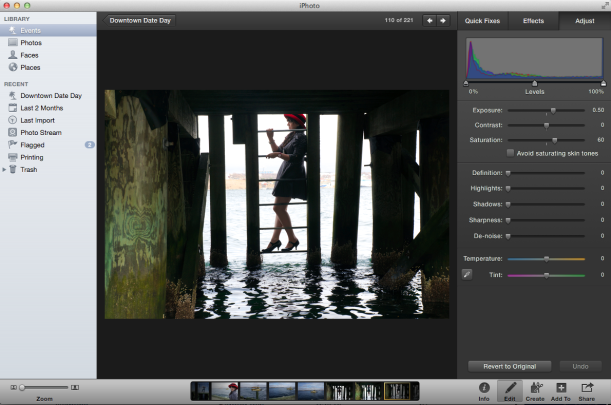
iPhoto is one of the main reasons I like my MacBook. It is so easy to use and has a beautiful, sleek interface. Its scroll-over view of photos inside folders makes it so easy to track down the photo I’m looking for. It comes with a basic editing suite that lets you do the basics: crop, retouch spots, fix the angle, and change the colour levels of the photo with boost effects and sliders. I use this to lighten up photos that have dark shadows, or to crop images so they feature a specific area more.

iphoto screen shot

iPhoto doesn’t have painting, text overlay, or image splicing capability, and for those I use Pixelmator. At just $15 on the app store, Pixelmator has most of the functionality of Photoshop, at a fraction of the cost. This software allows me to make compilations, collages and banners (and those are just the ones I do on a daily basis).

Word Processing and Presentations: Microsoft Office for Mac

Coding: Sublime Text

Browsing: Safari, Chrome, Firefox

Yes, I use all three for various reasons. I use Safari on my MacBook because it’s quick and easy without all the Google account stuff getting in the way, and I have a nice home stage with my frequently visited sites. Chrome is my go-to for my HP work laptop because it feels more professional and I need to concentrate when I use the internet. No browsing at work! Finally, Firefox is there for when I need to test a page in a reliable browser (Safari often screws up my javascript for a while before it suddenly settles and works). I also have Opera and IE (*shudder*) strictly for testing.

So techies, what’s your essential everyday software?

~Sage


2 Comments

5 Ways to Prevent “Computer Eyes”

At work, I often find myself trying to blink away what I call “Computer Eyes”. I spend so much time on my digital devices (yes, phones, tablets and cameras count too) that I can feel it in my eyes. Programmers, bloggers, facebook and pinterest junkies alike, you know what I’m talking about. Here are 10 simple ways to keep your eyes healthy and prevent “Computer Eyes”:

1. Look away from the screen every few minutes and take a second to let your eyes focus on something else. My office has nice big windows, so I look out at the sunny rooftops in between coding sprees.

2. Adjust your seat height so your screen is just below your eye level - you never want to be looking up at a screen, because that puts even more strain on your eyes.

3. BLINK. I know, it sounds stupid, but we actually blink less when we’re looking at screens.

4. Set the brightness of your screen to adjust automatically to the surrounding light. This will make it dimmer in the dark and brighter in the light, mimicking how your eyes react to light by changing the pupil size.

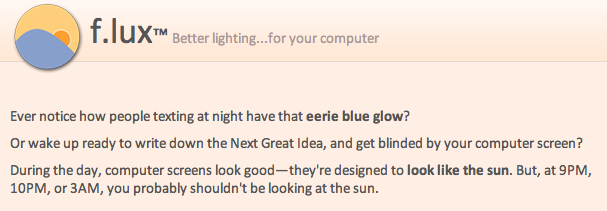
5. Download f.lux, a simple software that adjusts the tones of your computer screen at sunset. The first time I tried it I let out a huge sigh of relief, it was like a commercial. It’s free for Mac, Windows, Linux and iPhone/iPad, and has customizable settings so you can choose exactly which lighting level feels best on your eyes.


Do you have any other ways you prevent “Computer Eyes”? I’d love to hear them - leave a comment!

~Sage

Follow

Get every new post delivered to your Inbox.

Join 1,140 other followers